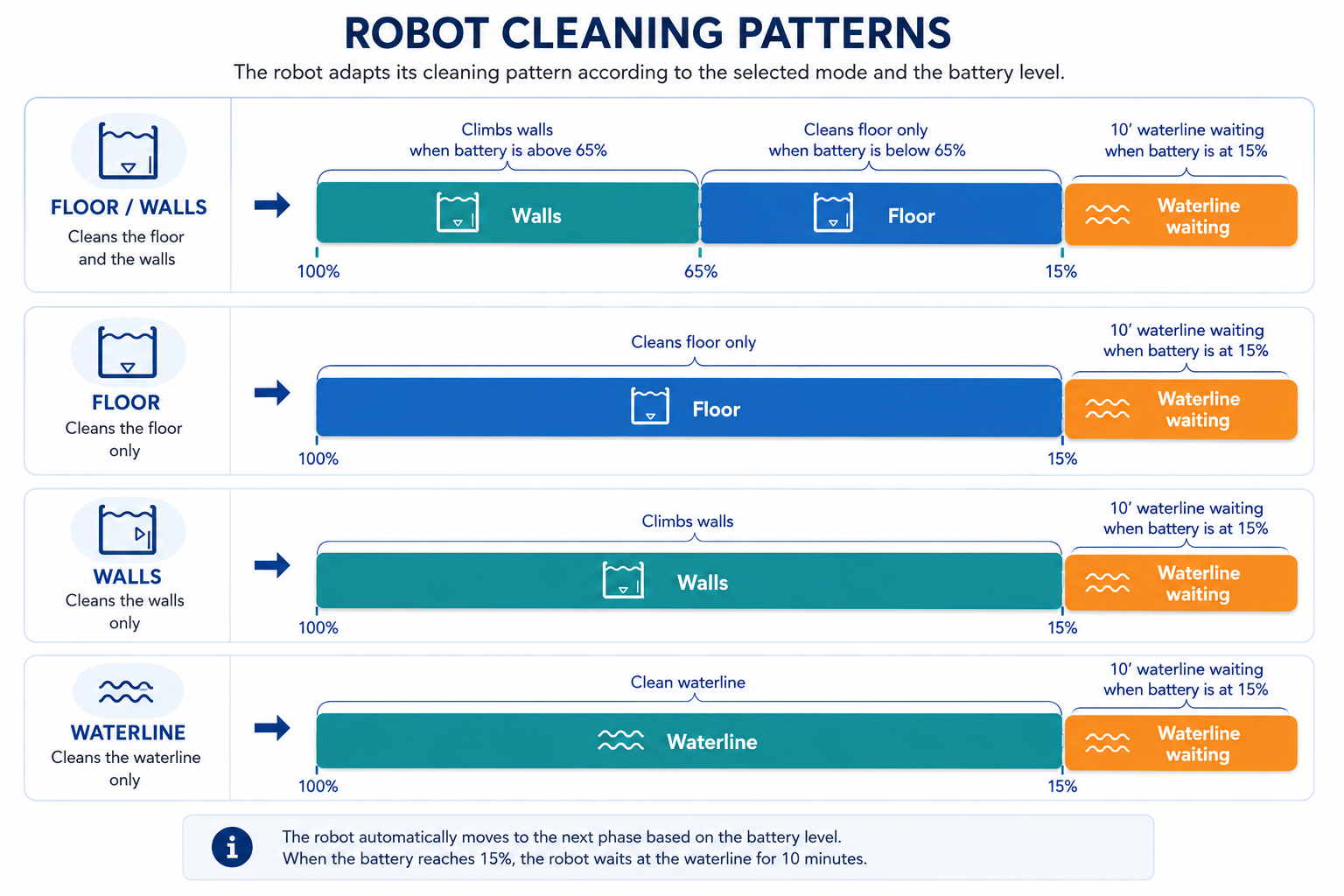
The robot offers several cleaning modes that define which areas of the pool are cleaned.
However, the robot’s behavior also depends on battery level and internal cleaning logic.
🤖 Available cleaning modes
Depending on your model, you can choose:
- Floor only → cleans only the pool floor
- Walls → focuses on climbing and cleaning walls
- Floor & Walls → cleans both walls and floor
- Waterline → cleans the waterline area
- Multi-day (app only) → scheduled cleaning sessions (floor only)
🔄 How cleaning modes work during a cycle
Even when a mode includes multiple areas (e.g. Floor & Walls), the robot follows a specific sequence:
- The robot typically starts with wall cleaning
- Then continues with floor cleaning
- At the end of the cycle, it moves to the waterline and stops
👉 The robot does not clean all areas continuously at the same time.
🔋 Impact of battery level
Battery level directly affects cleaning behavior:
- When battery is above ~65%:
- Wall climbing is more likely to occur
- As battery level decreases:
- The robot gradually prioritizes floor cleaning
👉 This allows the robot to complete the cycle efficiently.
⚠️ Important
- The selected mode defines the intended cleaning areas, but the robot may adapt its behavior during the cycle
- Wall cleaning may be reduced or stop if the battery level becomes low
- The robot does not perform full wall cleaning at the end of the cycle
- At the end of the cycle, the robot moves to the waterline for retrieval, not for cleaning
🧠 What to expect
- The robot follows predefined cleaning patterns
- Behavior may vary depending on battery level and pool conditions
- Some variations in cleaning coverage are normal
✅ In summary:
Cleaning modes define what the robot aims to clean, but the actual behavior depends on battery level and cleaning sequence. The robot adapts its operation during the cycle and finishes by moving to the waterline.