What you need before starting
Before pairing your robot, make sure you have:
- A Freedom Lite (WR000703)
- The Fluidra Pool app installed on your mobile device
- A stable Wi‑Fi network (2.4 GHz recommended)
- The Wi‑Fi password
- Access to the QR code inside the robot
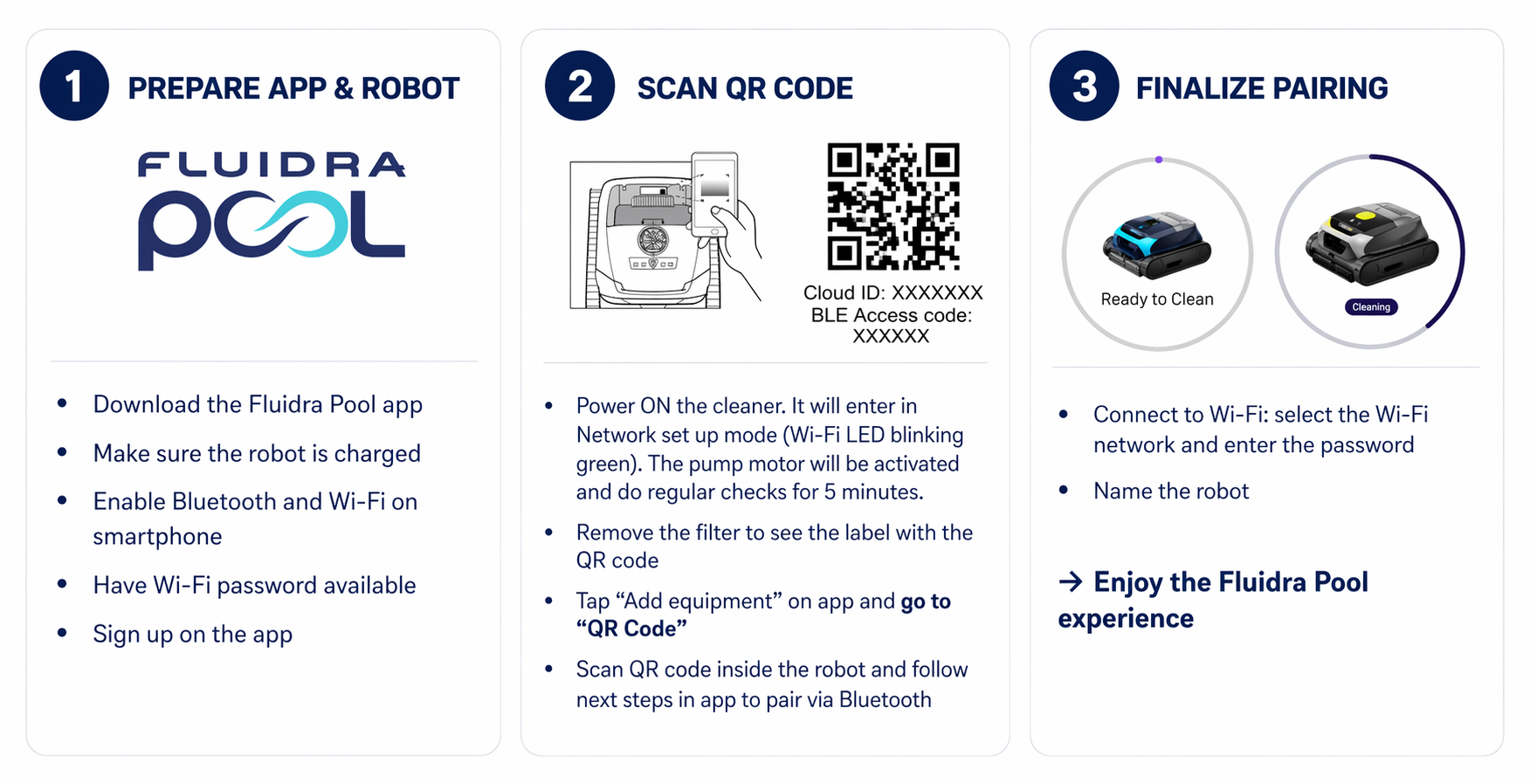
Step 1 – Power on the robot
- Press the power button on the robot
- The robot will automatically enter network configuration mode
✅ The Wi‑Fi LED will blink green, indicating it is ready to be paired.
Step 2 – Open the Fluidra Pool app
- Open the Fluidra Pool app
- Tap on Add a new robot
- Follow the on‑screen instructions
Step 3 – Scan the QR code
- Open the robot lid
- Locate the QR code inside the robot (near the filter canister)
- Scan the QR code using the app
✅ This step identifies the robot and links it to your account.
Step 4 – Bluetooth pairing
- The app will connect to the robot using Bluetooth
- This connection is used only during the setup process
✅ No manual Bluetooth activation is required — it is always enabled on the robot.
Step 5 – Connect to Wi‑Fi
- Select your Wi‑Fi network from the list
- Enter your Wi‑Fi password
- Confirm the connection
✅ The robot will connect to your Wi‑Fi network.
Step 6 – Confirmation
Once the setup is complete:
- The Wi‑Fi LED becomes solid green
- Your robot appears in the app dashboard
✅ The robot is now connected and ready to use.
Important notes
- Bluetooth is used only for the initial pairing
- Wi‑Fi is required for:
- App control
- Status updates
- Notifications
- The robot does not need Wi‑Fi to clean
What if the pairing fails?
If you cannot complete the pairing:
- Make sure the robot is in pairing mode (blinking green LED)
- Check that your phone is close to the robot
- Verify that you entered the correct Wi‑Fi credentials
- Ensure your network is compatible (2.4 GHz recommended)
You can restart the process by turning the robot off and on again.
Can I pair the robot without the app?
❌ No.
The initial pairing and Wi‑Fi configuration must be done through the Fluidra Pool app.
Summary
- Pairing includes Bluetooth setup + Wi‑Fi connection
- The process is done once
- Bluetooth is temporary, Wi‑Fi is ongoing
- The robot can clean without being connected to the app